
GSTS - Student Advisement Report Structure
Click on the links below to skip directly to the section:
Student Advisement Reports
The Graduate Student Tracking System or GSTS is the module within SIS that creates student advisement reports. The reports allow you to track progress towards degree completion. The requirements built into GSTS student advisement reports come from the Requirements tab on a program's Graduate Guide page.
Viewers should be aware:
- Double majors, dual degrees, joint degrees, doctoral minors, and graduate / professional certificate requirements are not tracked (no student advisement report available).
- Students who began a program before Fall 2014 will not have a report. This is due to significant changes in policy for graduate degree requirements.

Report Structure
Each student advisement report has five main sections: GSTS Report Information, Program Requirements, Program Minimum Requirements, Reference Section/Additional Courses, and Course History.

- GSTS Report Information: At the top of each report, there is a GSTS Report Information section with information about what the report shows. Its purpose is to identify the information used to build the reports and its limitations.
- Program Requirements: The second section in the report is built based on the Required Courses section of the Requirements tab on a program's Guide page. In this particular example, the section is called Program Requirements but some programs may have a variation of titles like "Required Coursework", "Core" or "Required Core".
- Program Minimum Requirements: Next, this section's information uses the information in the Curricular Requirements table of the Requirements tab on a program's Guide page.
- Reference Section/Additional Courses taken as a Graduate Student: The fourth section displays additional courses taken in the Graduate Career. These courses may not have been used to fulfill other program requirements or the breadth requirement (doctoral minor or graduate/professional certificate). If there is a course listed here that you believe should satisfy specific program requirements but is not, you may need to request an exception be added to the student's advisement report.
- Course History: The last section section displays ALL of the courses a student has taken at UW-Madison. This includes courses taken as an undergraduate, graduate, or Special student.

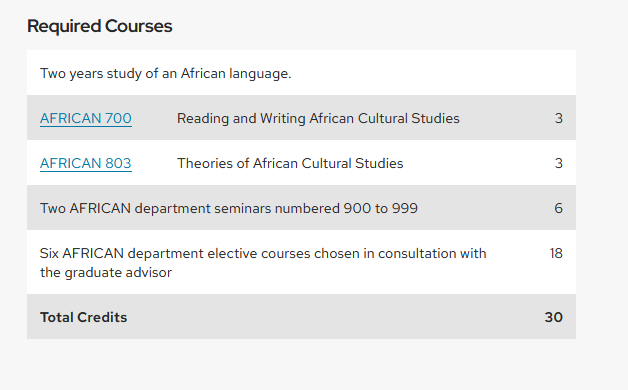
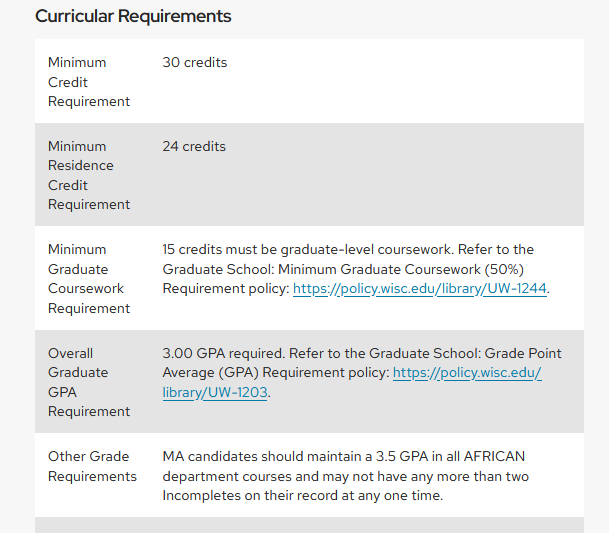
- Satisfied requirements appear as collapsed sections of the report.
- Not satisfied requirements will be open.
However, using the arrows at the side of each requirement and the Collapse All and Expand All buttons at the top of the page allow for different sections to be be opened or closed.
Course History Status Legend: Taken, Transferred and In Progress Courses
In the Course History section, you will notice a legend for the symbols in the Status column.
- Taken courses are courses that the student has already completed and received a final grade for (indicated with a green circle and black checkmark).
- Transferred courses will only appear if the program coordinator or manager has added transfer credit from prior coursework to a student's record (indicated with a green arrow pointing left).
- In Progress courses are courses that the student is currently enrolled in that have yet to be completed (indicated with a yellow diamond symbol). The report assumes students will successfully complete any courses that are In Progress.