

Internet Explorer - Runtime Error Workaround
Note: This workaround may not work in all cases. We do not have another reliable method to offer at this time.
When attempting to load a webpage you receive one of the following error messages:
- A Runtime Error has occurred. Do you wish to Debug?
- Internet Explorer Script Error. An error has occurred in the script on line 1. Do you wish to continue running scripts on this page?
To prevent this error from coming up, you will need to disable script and runtime errors. Perform the following to configure Internet Explorer to ignore these script and runtime errors:
- Open Internet Explorer.
- Click on Tools and select Options. (Note: In later versions Tools will display as a gear icon (
 ).
). - Click on the Advanced tab.
- Put a check in the box next to Disable script debugging (Note: Later versions will distinguish between 'Internet Explorer' and 'Other'. When given these options, select both.)
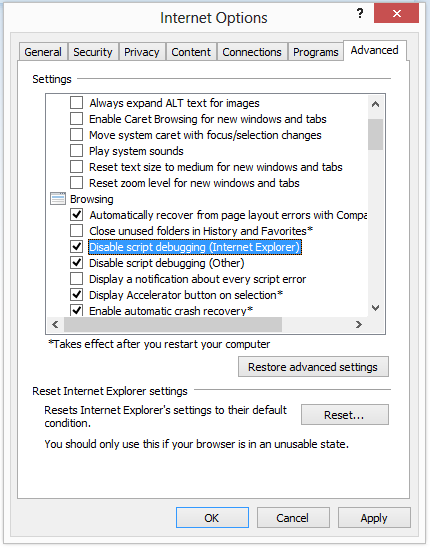
- Remove the check in the box next to Display a notification about every script error if this box is currently checked.

- Click OK to confirm your changes.
This does not actually fix the problem, it merely stops the window telling you about it from coming up. In order to actually fix the problem, the code of the script needs to be modified so that it does not produce errors. This cannot usually be done by an end user, and instead needs to be done by the administrator for the webpage that the error is occurring on.
Note: Some users have reported that after trying the above steps they discovered the problem was malware related. So if all the previous steps fail you should run a full virus scan.