

Internet Explorer 9, 10, and 11 (Windows) - Clearing Cache and Cookies
This document explains how to clear the cache and cookies in Internet Explorer 9, 10 and 11.
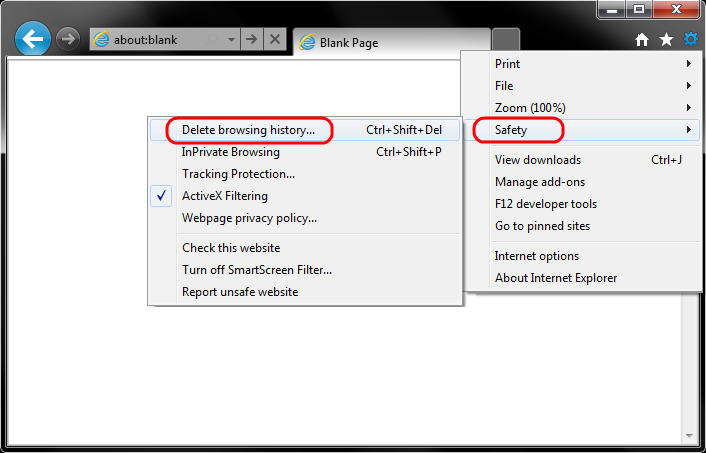
- Select Tools (via the Gear Icon) > Safety > Delete browsing history....
NOTE: You can also access this menu by holding Ctrl + Shift + Delete.
- Make sure to uncheck Preserve Favorites website data and check both Temporary Internet Files and Cookies then click Delete.

- You will get a confirmation at the bottom of the window once it has successfully cleared your cache and cookies.

Further Troubleshooting
The above procedure for clearing cache and cookies should work for the majority of websites, but certain website and applications such as WiscMail require a more thorough procedure. If you are still having issues, try to steps below.
Note: The F12 developer tools in Internet Explorer 11 do not include a cache menu. This process will only work for IE10 or lower.
-
Close out of Internet Options. Click on Tools and select Developer Tools.

-
In the Developer Tools window, click on Cache and select Clear Browser Cache...

-
Click Yes to confirm the clearing of the browser cache.
