Firefox 4-56 (Windows) - Clearing Cache and Cookies
This document explains how to clear the cache and cookies from Mozilla Firefox 4.0 to the newest version.
Click the Menu (three stacked horizontal lines), click History, then click Clear Recent History....
NOTE: You can also access this menu by holding Ctrl + Shift + Delete.
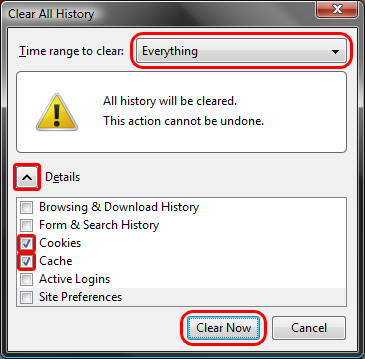
Click on the drop down box to the right of Time range to clear: and select Everything. Then, click on Details and check both Cookies and Cache. Click on Clear Now.
Keywords:
Firefox ff ff4 ff5 ff6 4 5 6 four five six clear clearing remove removing cache cookies reset
We appreciate your suggestion. Thank you!
Doc ID:
17504
Owned by:
Help Desk KB Team in DoIT Help Desk
Created:
2011-03-27
Updated:
2026-05-25
Sites:
Chippewa Valley Technical College, DoIT Help Desk, Michigan State University Demo, NDSU IT Knowledge Base, University of Illinois Engineering IT, University of Illinois School of Chemical Sciences, University of Illinois System, University of Illinois Technology Services, University of Maryland Engineering IT, UW Stout, UW System Administration DLE